
Predictive Maintenance: How to Stop Your AI Coolers from Melting Down
Master ai cooler maintenance with this checklist to prevent downtime and protect your smart cooler ROI.
Why AI Cooler Maintenance Determines Whether Your Smart Cooler Pays for Itself
AI cooler maintenance is the difference between a smart cooler that quietly generates revenue 24/7 and one that frustrates your employees with recognition errors, warm drinks, and payment failures.
Here is what good maintenance looks like at a glance:
| Task | Frequency |
|---|---|
| Visual inspection (cameras, seals, door) | Weekly |
| Camera lens cleaning | Weekly |
| Condenser coil cleaning | Monthly |
| Software and firmware updates | Monthly |
| SKU retraining for new products | As needed |
| Full sensor calibration check | Quarterly |
| Deep cleaning (interior surfaces, fans) | Quarterly |
| Temperature and refrigeration audit | Quarterly |
AI coolers are simpler than traditional vending machines — they have no motors, conveyors, or robotic parts — but their computer vision cameras, cloud software, and refrigeration systems all need regular attention to perform at the 99%+ accuracy levels operators expect.
Neglect any one of those layers and you start seeing false charges, missed inventory counts, and temperature drift. That erodes customer trust fast, especially in a breakroom or office setting where the same people use the machine every day.
I'm Manuel Mojica, founder of MM Healthy Vending and the nationwide operator community Vending Circle, and I've built a 7-figure smart cooler and vending operation by learning exactly which AI cooler maintenance tasks prevent costly downtime versus which ones waste time. In this guide, I'll share the practical, field-tested approach we use across our deployments so you can keep your coolers running at peak performance.

What is an AI Cooler and How Does It Work?
To understand why AI cooler maintenance is so critical, we first need to look under the hood of what an AI cooler actually is. Unlike traditional vending machines that rely on physical coils, drop sensors, and heavy mechanical parts to dispense snacks, an AI cooler functions as a smart, locked refrigerator.
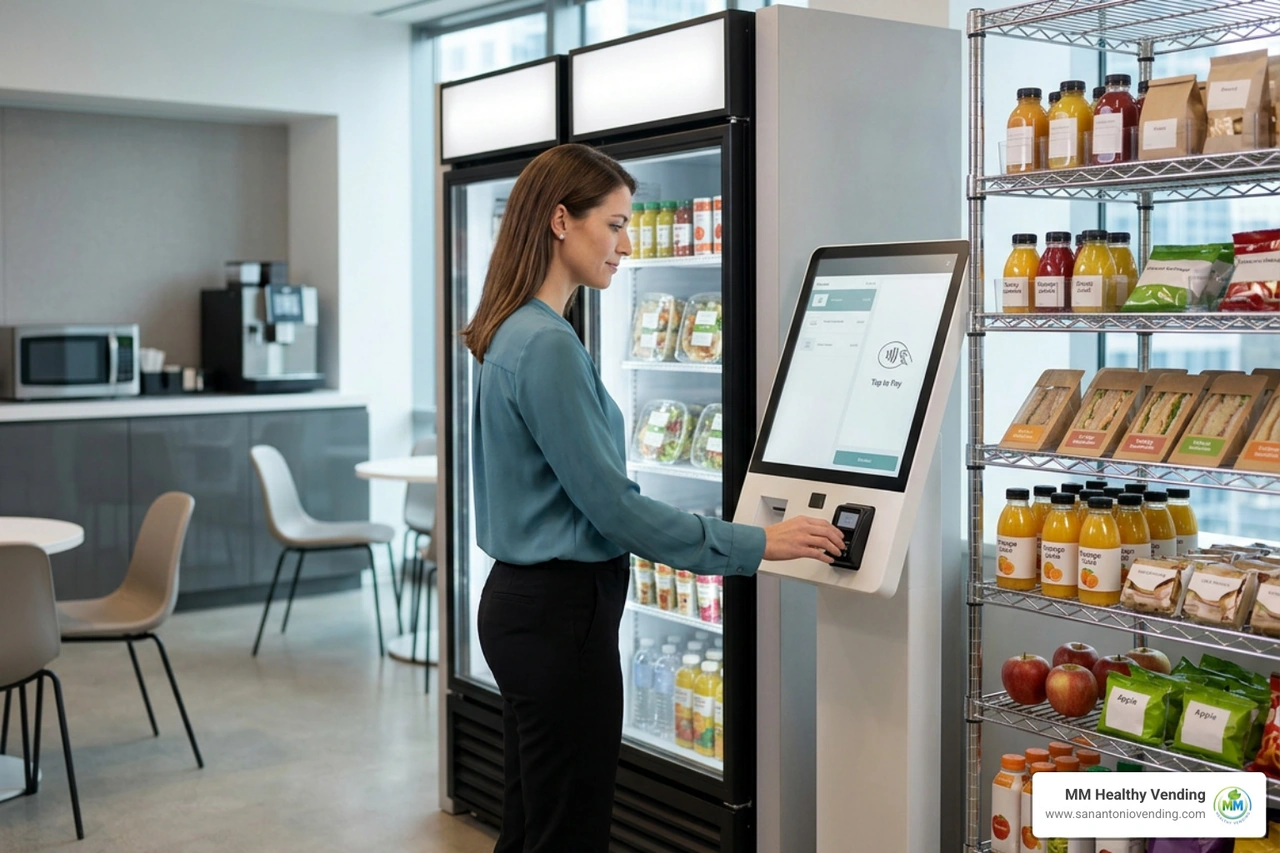
The customer experience is completely frictionless: a customer taps or swipes their credit card, mobile wallet, or campus card to unlock the door. They open the door, browse the shelves, grab what they want, and simply walk away. The moment the door closes, the system automatically bills them for the exact items they removed.

This seamless "grab-and-go" experience is made possible by a combination of high-definition cameras, edge computing processors, and deep learning algorithms. When the door is opened and closed, the internal cameras capture multi-angle video logs of the shelves. The AI model analyzes these frames in real-time, matching the visual characteristics of the products removed against a pre-trained SKU database. If a customer takes a beverage, looks at it, and puts it back on a different shelf, the computer vision system tracks that behavioral data and accurately registers that no purchase was made.
To explore how these systems can elevate your workplace refreshment options, you can check out our dedicated page on AI Smart Coolers.
Computer Vision vs. Weighing Sensors
When choosing smart retail hardware, operators typically compare vision-based AI coolers with weighing-sensor coolers. While both serve the grab-and-go market, they rely on entirely different technologies to track inventory.
Weighing coolers use high-precision load cells integrated directly into the shelves. When an item is removed, the cooler detects the drop in weight and matches it to a database of product weights. While this works well for highly standardized, heavy products, it struggles with similar-weight items and is highly sensitive to physical shelf deformation, ice buildup, or moisture.
AI coolers, on the other hand, use multi-angle computer vision systems. This allows them to handle high SKU diversity, packages of identical weights but different designs, and complex product packaging with ease.
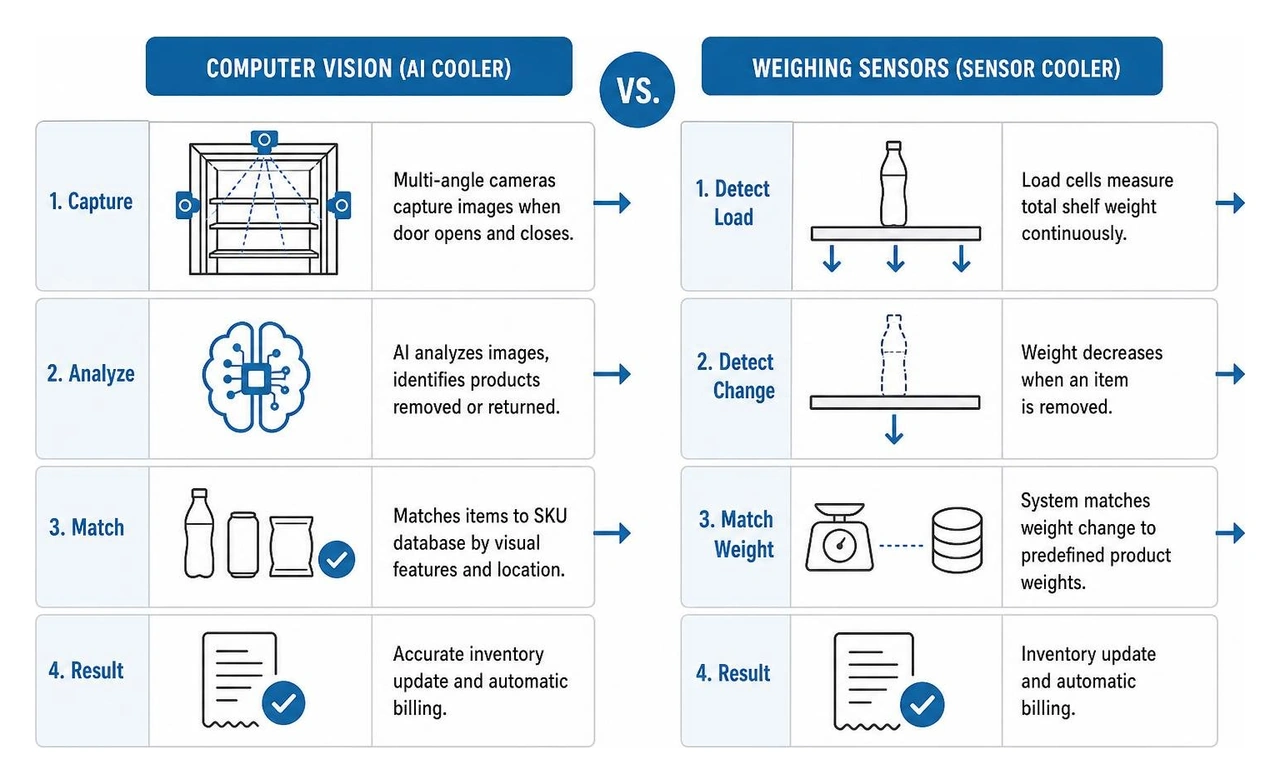
Here is a quick breakdown of how these two technologies compare:
| Feature | Computer Vision AI Coolers | Weighing Sensor Coolers |
|---|---|---|
| Core Technology | Multi-angle cameras & deep learning | High-precision load cells & weight databases |
| SKU Flexibility | High; easily differentiates similar-weight items | Low; cannot differentiate products of identical weight |
| Behavioral Insights | Captures customer picking paths and heat maps | Detects basic inventory weight deductions only |
| Environmental Sensitivity | Affected by lighting changes and camera occlusion | Affected by ice, frost, moisture, and shelf warping |
| Primary Maintenance Needs | Lens cleaning, camera calibration, software updates | Periodic weight recalibration, mechanical alignment |
Key Benefits of Smart Coolers over Traditional Vending
For businesses in San Antonio and surrounding areas like Helotes and Alamo Heights, upgrading from old-school machines to AI smart coolers offers massive operational and financial advantages.
First, smart coolers are significantly more cost-effective to buy and operate than traditional vending machines. Because they have no motors, spirals, drop chutes, or complex bill validators, there are fewer physical parts to break. This drastically lowers your ongoing repair costs.
Second, they offer incredible inventory flexibility. In a traditional machine, you are physically limited by the size of the metal coils. If a product package changes size by half an inch, it won't dispense properly. An AI cooler lets you stock salads, fresh fruit, sandwiches, glass bottles, and odd-shaped snack packages on the same shelf without worrying about mechanical jams.
Finally, they meet modern consumer preferences. Cashless payments accounted for 67% of all sales at vending machines in 2022 and grew 11% year-over-year compared to 2021. In 2026, cash is practically obsolete in corporate breakrooms. Smart coolers are built from the ground up for secure, PCI-compliant cashless transactions, providing a modern experience that keeps employees happy.
If you want to compare these systems to classic setups, check out our guide on Traditional Vending.
The Ultimate Checklist for AI Cooler Maintenance
Because AI smart coolers are highly advanced computers wrapped in commercial refrigerators, keeping them running smoothly requires a specialized touch. You aren't just maintaining a compressor; you are keeping an active IoT device healthy.

Establishing a Routine for AI Cooler Maintenance
To ensure your smart retail investments last for years, you must establish a clear seasonal and monthly cadence for ai cooler maintenance.
1. Camera and Sensor Care
The "eyes" of your cooler must remain spotless. Every week, operators or site managers should wipe down the camera lenses using a clean, dry microfiber cloth. Avoid using harsh chemical glass cleaners directly on the lenses, as this can degrade protective anti-fog coatings. If a camera lens becomes occluded by dust or condensation, the deep learning model won't recognize products accurately, resulting in missed transactions or false charges.
2. Software and Firmware Updates
Just like a smartphone, your smart cooler relies on regular software updates to improve product recognition accuracy, patch security vulnerabilities, and update payment processing protocols. We recommend scheduling monthly checks of your cooler's backend management system to push pending updates during off-peak hours.
3. Refrigeration System Upkeep
Dust on condenser fins is the number-one killer of commercial refrigeration units. When dust builds up, the compressor has to work twice as hard to maintain food-safe temperatures, driving up your energy bills and leading to premature mechanical failure.
For general refrigeration and dust-clearing techniques, you can refer to the Air Cooler Maintenance Guide (2026). Additionally, for tips on clearing radiator fins and checking fan assemblies, the step-by-step cleaning instructions in the How to Clean an AIO Liquid CPU Cooler | CORSAIR guide can provide helpful mechanical parallels on how to properly blow out dust without damaging delicate fins.
Why Proactive AI Cooler Maintenance Protects Your ROI
Taking a proactive approach to ai cooler maintenance directly impacts your bottom line. When a cooler is well-maintained, its energy consumption drops, its physical lifespan extends, and customer satisfaction remains high.
Consider the computing hardware inside these units. AI coolers use onboard GPU or AI edge processors to run computer vision models locally. These processors generate significant heat, especially when the cooler is placed in a warm environment or experiences high traffic.
If you are curious about how sustained, 24/7 AI workloads place unique thermal stress on hardware components, you can read the Water Cooling Maintenance Guide for 24/7 AI Rigs – FormulaMod. While that guide focuses on liquid-cooled computer systems, it highlights how continuous high-temperature operations accelerate the degradation of gaskets, processors, and electrical components.
For a deeper dive into how air-cooled versus liquid-cooled systems handle continuous AI processing, check out the comparison in Liquid vs Air Cooling for 24/7 Inference Rigs - Thorsten Meyer AI. In the context of smart vending, ensuring that your cooler's internal ventilation fans are clear of dust prevents these critical edge processors from thermal throttling or failing entirely.
Troubleshooting Common Smart Cooler Failures
Even with a perfect maintenance routine, electronic and mechanical issues can occasionally pop up. Knowing how to diagnose them quickly keeps downtime to a minimum.

Resolving Product Recognition and Sensor Errors
If your system is generating false charges or failing to recognize when a customer takes an item, the issue is almost always related to camera visibility, lighting, or the product database.
- Camera Occlusion: Check if a tall product (like a large energy drink or a bag of chips) is blocking the line of sight of one of the cameras. Always train stocking staff to place items neatly in their designated lanes.
- Lighting Shifts: AI computer vision algorithms rely on consistent internal lighting. If an LED strip inside the cooler flickers or burns out, the sudden change in shadows will confuse the recognition model. Replace faulty LED lights immediately.
- SKU Retraining: If you introduce a new product or a manufacturer changes their packaging design, the AI model may not recognize it. You must upload images of the new packaging to your cloud platform to retrain the neural network before stocking the item.
If you are looking for alternative unattended retail setups that offer different inventory tracking methods, you might want to look into Micro Markets.
Fixing Refrigeration and Mechanical Issues
If the cooler is failing to keep products cold, or if you notice water pooling at the base, you are dealing with a standard refrigeration issue.
- Door Seal Wear: If the magnetic door gaskets are torn or dirty, warm air from your office or breakroom will seep into the cooler. This causes frost buildup and forces the compressor to run constantly. Clean the gaskets weekly with warm water and replace them if they lose their magnetic seal.
- Airflow Blockages: Ensure that products are not pushed directly against the back wall of the cooler, as this can block the internal air circulation vents.
If you are located in the San Antonio area and require professional help with refrigeration repairs, there are several excellent local resources available:
- For commercial refrigeration and food equipment repairs in the metro area, you can contact Commercial Refrigeration Air Conditioning Food Equipment ....
- If you are operating coolers near New Braunfels, look up local repair options on THE BEST 10 Appliances & Repair near NEW ....
- For services near Boerne, check out Boerne, TX 78006 - Appliances & Repair.
- If you need prompt assistance in Schertz, you can reach out to Save On Air Conditioning Repair In Schertz, TX - A&A Plumbing.
- Operators in Seguin can find dependable local help through Joe Cools AC & Heating: HVAC Services in Seguin, TX.
- If your machine is located in Helotes, you can find certified technicians via Heating and Air Conditioning Repair in Helotes, TX - The Home Depot.
- For locations in Alamo Heights, consider Alamo Heights HVAC – 24/7 Repair & Installation to get fast, local service.
Frequently Asked Questions about Smart Coolers
How do AI coolers prevent theft and handle payments?
AI coolers are incredibly secure. The physical door remains locked at all times until a customer presents a valid payment method. The payment terminal performs a pre-authorization hold on the customer's card (similar to a gas pump) to ensure the account has sufficient funds before unlocking the door.
Once the door opens, integrated security cameras log every movement. Because the transaction is tied directly to the swiped card, any items removed when the door closes are automatically billed to that user. This virtually eliminates the "shrinkage" (theft) commonly associated with open micro markets.
What factors should I consider when choosing an AI cooler model?
When selecting an AI cooler for your business, consider the following:
- Capacity: Make sure the cooler size matches the daily traffic of your location. A small office of 30 people needs a single-door cooler, while a manufacturing facility with 200+ employees requires a double-door or multi-unit setup.
- Location Suitability: AI coolers perform best in semi-closed environments like corporate offices, private gyms, hospitals, or secure school campuses where there is a consistent, familiar user base.
- Energy Efficiency: Look for models with Energy Star ratings and double-paned, low-E glass doors to keep operating costs low.
- Remote Monitoring: Ensure the cooler's software platform offers real-time inventory tracking so you can see what is selling without making unnecessary physical trips.
How do smart coolers compare to micro markets?
Smart coolers offer a much smaller physical footprint than micro markets, making them ideal for locations that want fresh food options but don't have the space for open shelving and a standalone checkout kiosk. Additionally, because smart coolers are physically locked, they offer much higher security and lower theft rates than micro markets in semi-public spaces.
To learn more about how these options compare, take a look at our breakdown of Micro Markets.
Conclusion
At MM Healthy Vending, we believe that providing high-quality refreshments to your team shouldn't come with a headache. That is why we provide state-of-the-art smart coolers, traditional vending machines, micro markets, and office coffee setups at absolutely zero cost to businesses throughout San Antonio, New Braunfels, Boerne, Schertz, Seguin, and Helotes.
We fully manage the delivery, stocking, and technical ai cooler maintenance of every unit we place. Plus, with our industry-leading 2-hour local support, you can rest easy knowing that if any technical issues ever arise, our team will have them resolved before your next lunch rush.
Ready to upgrade your breakroom with a modern, hassle-free smart cooler? Visit our Services page today to get started!
You might also like...
More articles like the one you've read to keep you up-to-date on all things vending in San Antonio

Why San Antonio businesses choose us
Premium service, local expertise, cutting-edge technology
AI-powered smart coolers
Advanced computer vision technology for seamless, cashless transactions. Just grab what you need and go.
cashless
24/7 service
Round-the-clock support with an average 2-hour response time for any issues.
Local & trusted
Family-owned business proudly serving San Antonio since 2024
Ready to upgrade your breakroom?
Join hundreds of San Antonio businesses enjoying free, premium vending soutions